Looking for HypeBoard? HypeBoard Click here →

The things a scoresheet does not tell you.

Two of them. One that reads a single game the moment you finish tagging it, and one that hands your whole season to an AI assistant and lets you ask it anything. Click any screenshot to see it full size.

Read the game

Built in, instant, and there before you have finished putting the kettle on.

A 4–1 win that was not quite what it looked like

The scoresheet from this one says comfortable. Three goals clear, a goalie who gave up a single shot. Nothing to look at.

Read the game looked at the same night and found four things worth a conversation. You carried the play — 57% of the shot attempts, and 20 scoring chances to their 8, so the win was earned rather than lucky. But your goalie stopped 95% of 21 shots, and eight of those came from dangerous places, which means part of that scoreline is them rather than the defending in front of them. You spent 13 minutes a man down. And your #9 won one faceoff out of eight, on a night nobody would have thought to check.

None of that is on a scoresheet, and none of it survives until Tuesday's practice unless something writes it down while it is fresh.
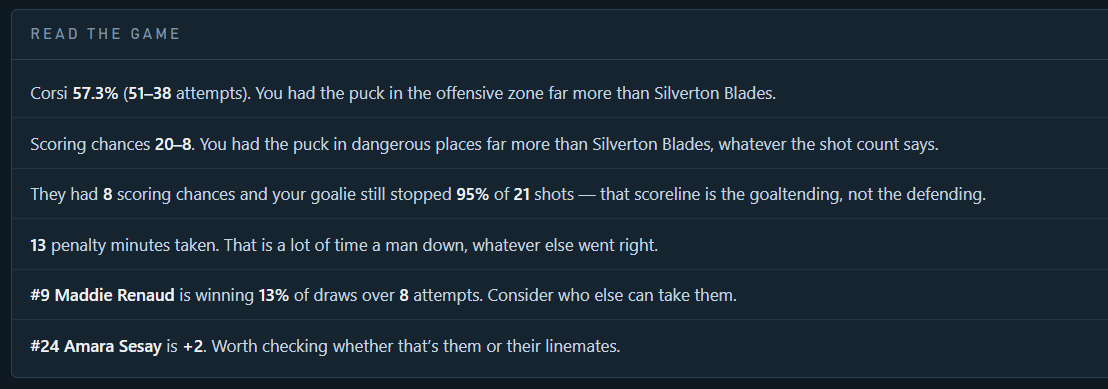
The Read the game panel listing six plain-English observations about a single game.
Screenshot — Read the game

The AI Enabled export

One click, one file, and a season's worth of questions you could not otherwise ask.

Season totals are easy. Everything else is not.

Any coach can read a stats table. Goals, points, save percentage — the aggregate is right there and it takes ten seconds.

What no table shows you is the shape of a season. Whether a player has quietly stopped scoring since Christmas. Whether the shots one defender takes are getting through and another's are not. Whether the thing you keep typing into your notes is actually showing up in the goals against. Those live in the combinations — this player, in that period, from that part of the ice, over those ten games — and there are more combinations than anyone has evenings to check.

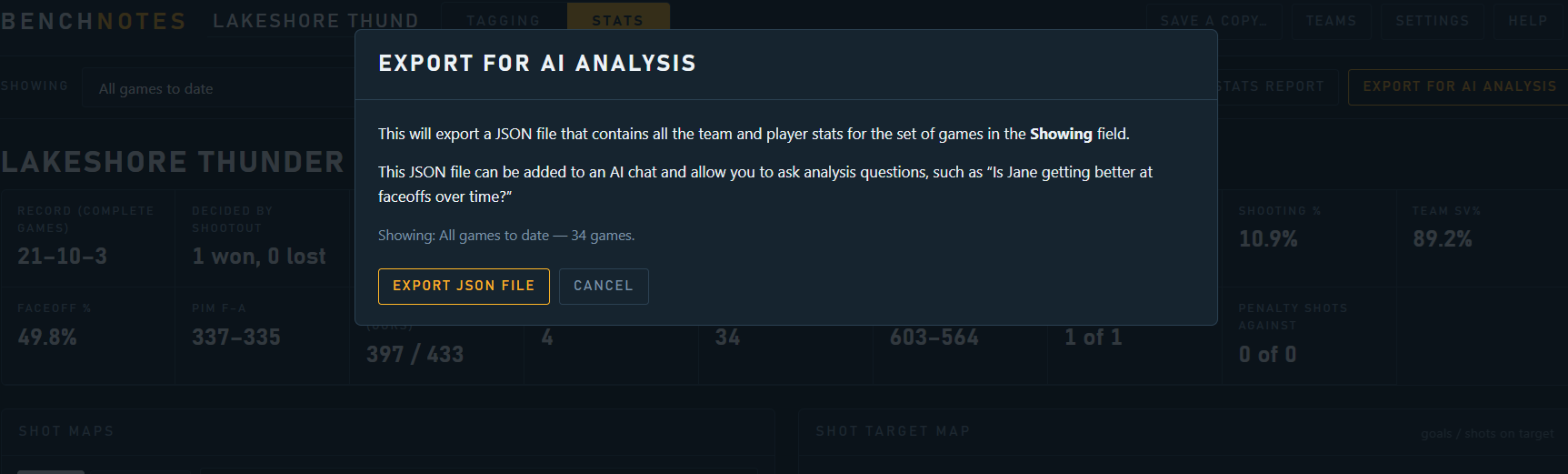
So BenchNotes writes the whole thing out in a format an AI assistant can read: every play you tagged, plus an explanation of what each field means and how each number should be read. Then you ask it questions in plain English.

The Export for AI analysis dialog, showing it will export all games currently in view.
Screenshot — Export for AI analysis

What that actually looks like

A real team, 34 games tagged, one file, one question.

The whole season, in one file

The export goes into an AI chat the same way you would attach a photo, and the question is the sort of thing you would ask an assistant coach: take a look, and tell me what I missed.

Nothing about this is set up in advance. There is no account, no integration and no configuration. BenchNotes writes the file, you take it wherever you like, and what happens next is between you and whichever assistant you use.

The exported JSON file attached to an AI chat with a question about season insights.
Screenshot — the file, and the question

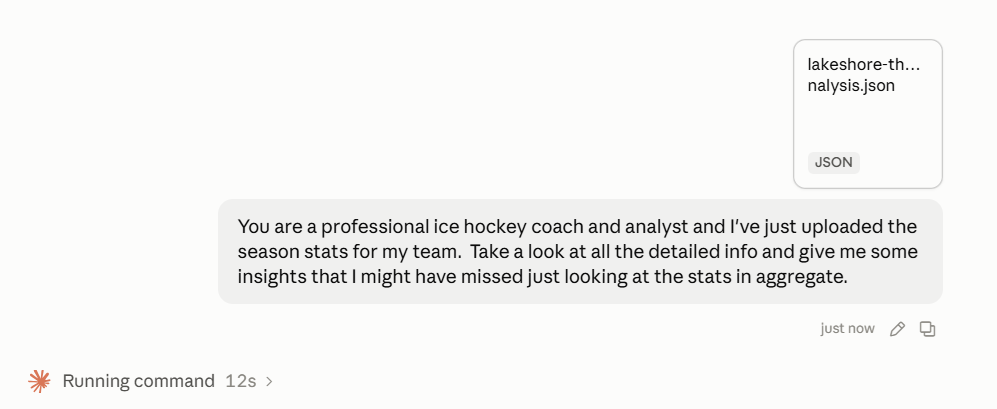
“The late-season slide was a finishing problem, not a play problem”

This is the answer that saves a season. The team went 3–5 down the stretch and scoring dried up — the point where most of us tear up the systems and start again in practice.

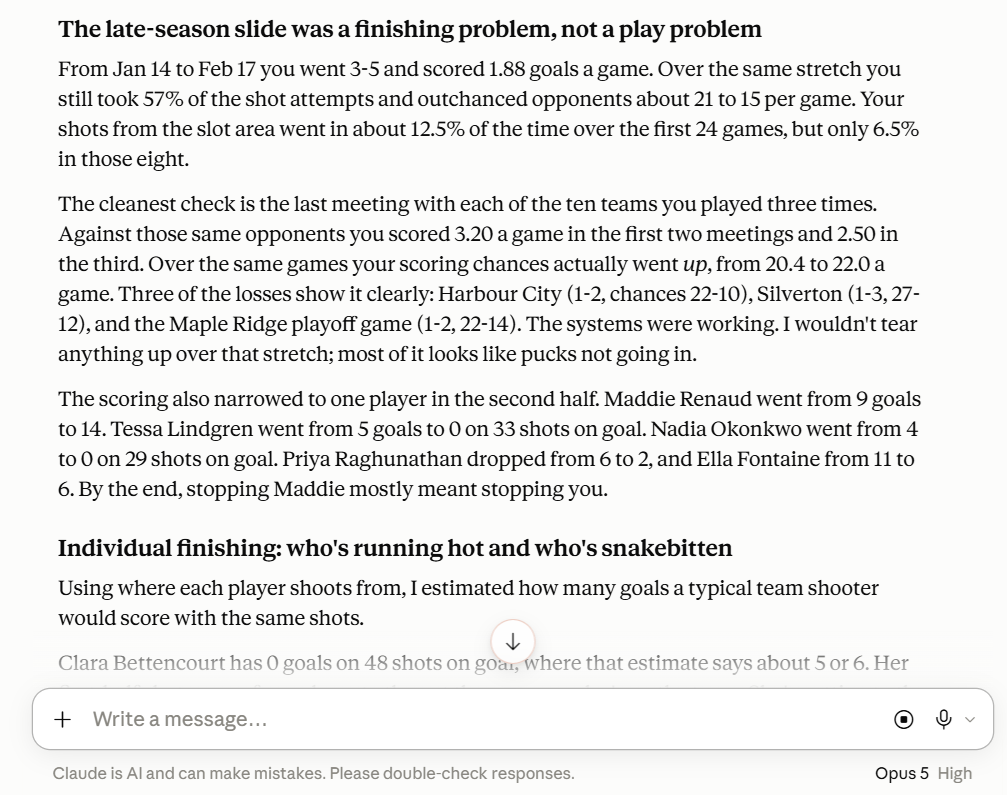
Over those same eight games they were still taking 57% of the shot attempts and still outchancing the opposition 21 to 15. Shots from the slot went in 12.5% of the time over the first 24 games and 6.5% in the last eight. Same play, colder finishing.

Then it does the check you would never have the patience for: the ten opponents played three times each, first two meetings against the third. Scoring fell from 3.20 a game to 2.50 while scoring chances actually went up. That is a conclusion you can act on, and the action is to change nothing.

AI analysis explaining that the late-season slide was a finishing problem rather than a play problem.
Screenshot — the late-season slide

The player with nothing on the scoresheet

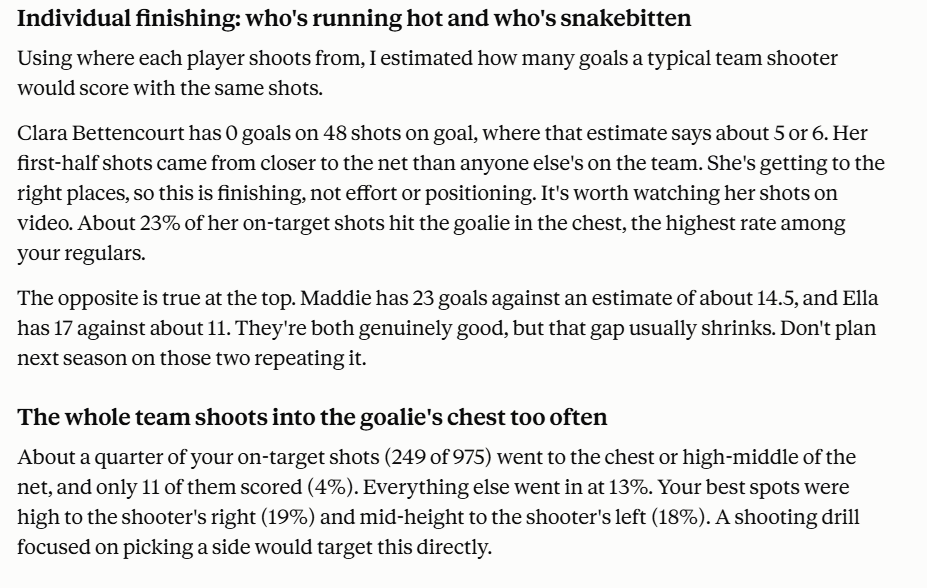
One forward has 0 goals from 48 shots on target. On a stats table they look like someone to move down the lineup.

Read against where every other player shoots from, their shots come from closer to the net than anyone else's on the team. They are getting to the right places and not finishing — a completely different problem with a completely different fix. It even found the likely reason: 23% of their shots on target hit the goalie in the chest, the highest rate on the team.

Nowhere in BenchNotes is there a column called “shots into the goalie's chest.” That number does not exist until somebody goes looking for it, and it came out of the same net map you filled in one click at a time.

AI analysis of individual finishing, including a player scoring below expectation and shots hitting the goalie's chest.
Screenshot — individual finishing

It reads the notes you typed, too

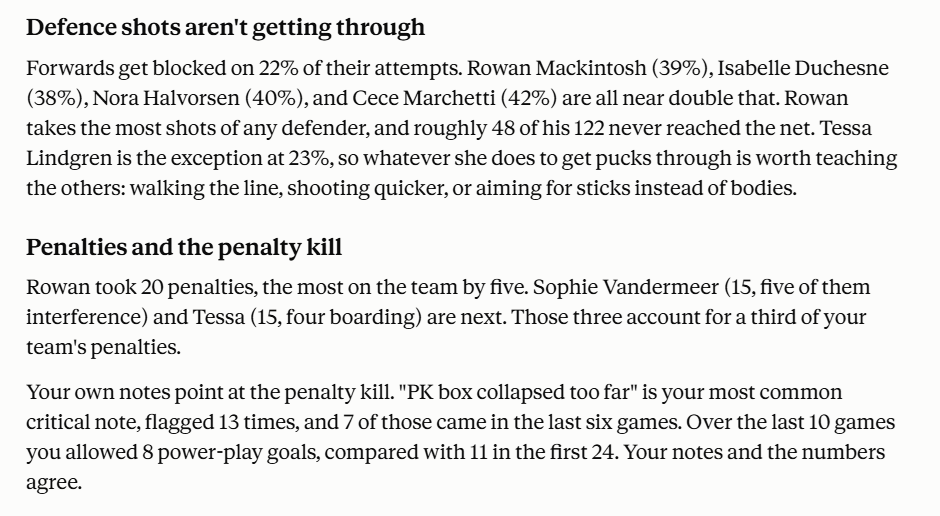
Forwards get blocked on 22% of their attempts. Four defenders sit near double that, one of them losing 48 of 122 shots before they reach the net — while a fifth defender is down at 23%, which makes them the one to learn from rather than a statistic to worry about.

Then it goes somewhere no spreadsheet can follow. “PK box collapsed too far” is the note this coach typed most often, 13 times, 7 of them in the last six games. Over those last ten games the team allowed 8 power-play goals, against 11 in the first 24. Your own words and your own numbers, pointing at the same thing.

You wrote those notes one at a time, months apart, while watching video. Nobody remembers them. The file does.

AI analysis of blocked defence shots and penalties, cross-referenced with the coach's own tagged notes.
Screenshot — defence shots and the penalty kill

All of it from one evening's tagging

Every number on this page came from a coach pressing keys while watching games he was going to watch anyway.